EV-01
Topología en Packet Tracer
Los siete dispositivos conectados y con enlaces activos.
Redes de Computadoras · proyecto grupal
Qué ocurre entre escribir una dirección web y ver la página. Construimos la red completa en Cisco Packet Tracer, la medimos y seguimos una solicitud trama por trama: laptop, switch, router, Internet simulado y servidor.
▶ INICIAR VIAJE DEL PAQUETEEl proyecto
Un navegador pide una página y la recibe en milisegundos. Entre medio hay resolución de nombres, direcciones que cambian, tablas que se consultan y conexiones que se abren y se cierran. Casi nada de eso se ve.
Entender cómo viaja realmente un paquete desde una solicitud web hasta su respuesta, y qué cambia en cada salto.
Una red real de siete dispositivos construida y verificada en Packet Tracer, más esta demostración interactiva, los diagramas y el video, como solución didáctica con sus límites explícitos.
Cada valor mostrado (MAC, IP, TTL, puertos) proviene de comandos y de unidades de datos (PDU) leídas en Packet Tracer. Lo que se dedujo del modelo se marca como «derivado».
.test está reservado por la RFC 2606.Demostración interactiva
28 tramas en cuatro fases: ARP, DNS, TCP y HTTP. Pulsa «Iniciar» o avanza a mano. El panel muestra las cuatro capas de cada trama con los valores reales de la red construida.
Trama 1 de 28
Observado
Evidencia:
Cada router crea una trama nueva: cambian las MAC y el TTL; solo R1 cambia la IP de origen (NAT). Pulsa una fila para ir a esa trama.
| # | Mensaje | Tramo L2 | IP origen → destino | TTL |
|---|
Modelos de capas
Los dos modelos dividen la comunicación en capas. Cada capa añade su encabezado al enviar y lo retira al recibir. En Packet Tracer, la pestaña «OSI Model» de cada PDU muestra esas capas.
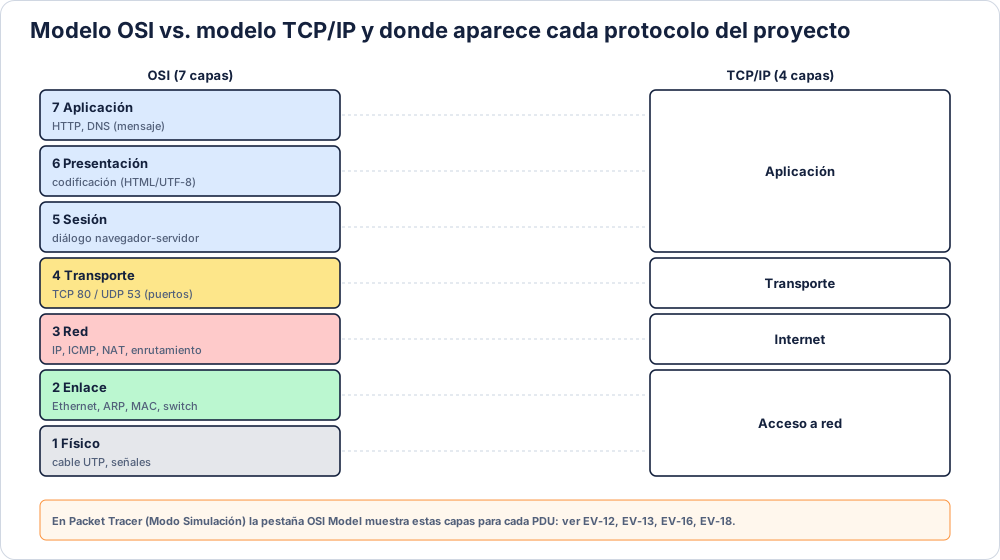
| OSI | TCP/IP | Unidad de datos | En este proyecto |
|---|---|---|---|
| 7 Aplicación · 6 Presentación · 5 Sesión | Aplicación | Datos | HTTP (GET, 200 OK) y mensajes DNS |
| 4 Transporte | Transporte | Segmento / datagrama | TCP puerto 80, UDP puerto 53 |
| 3 Red | Internet | Paquete | IPv4, ICMP, NAT, enrutamiento |
| 2 Enlace | Acceso a red | Trama | Ethernet, MAC, ARP, switch |
| 1 Físico | Acceso a red | Bits | Cable UTP directo y cruzado |
Protocolos
Para cada protocolo: qué es, qué hace en nuestra red y dónde se comprobó.
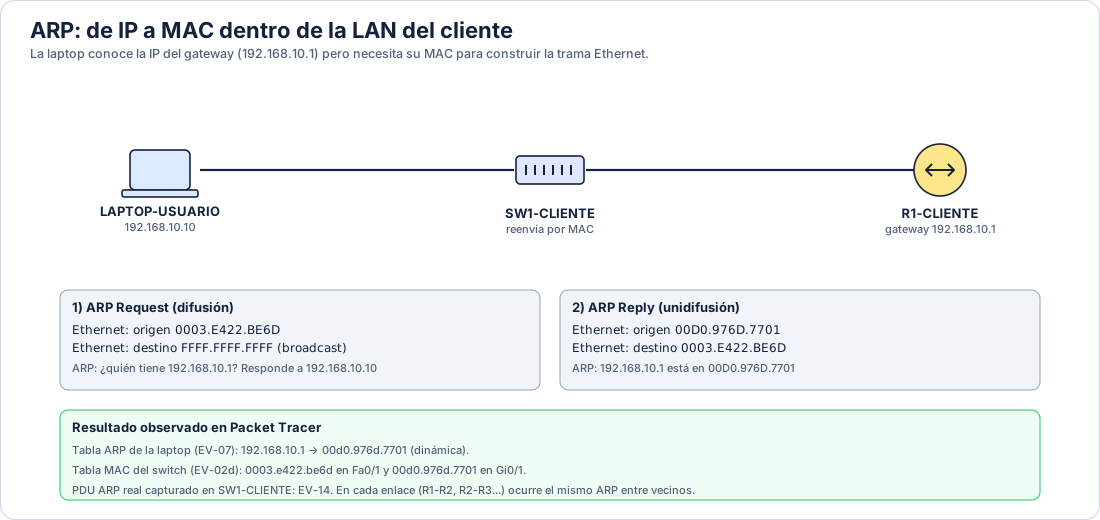
En una red local las tramas se entregan por MAC, pero las aplicaciones usan IP. ARP (Plummer, 1982) pregunta por difusión «¿quién tiene esta IP?» y el dueño responde con su MAC. La respuesta se guarda en una tabla.
La laptop (192.168.10.10) necesita la MAC de su gateway, 192.168.10.1, para cualquier destino fuera de su red. Aprendió 00D0.976D.7701, la interfaz Gi0/0 de R1. Cada router repite el proceso con su vecino, y por eso el primer paquete suele perderse.
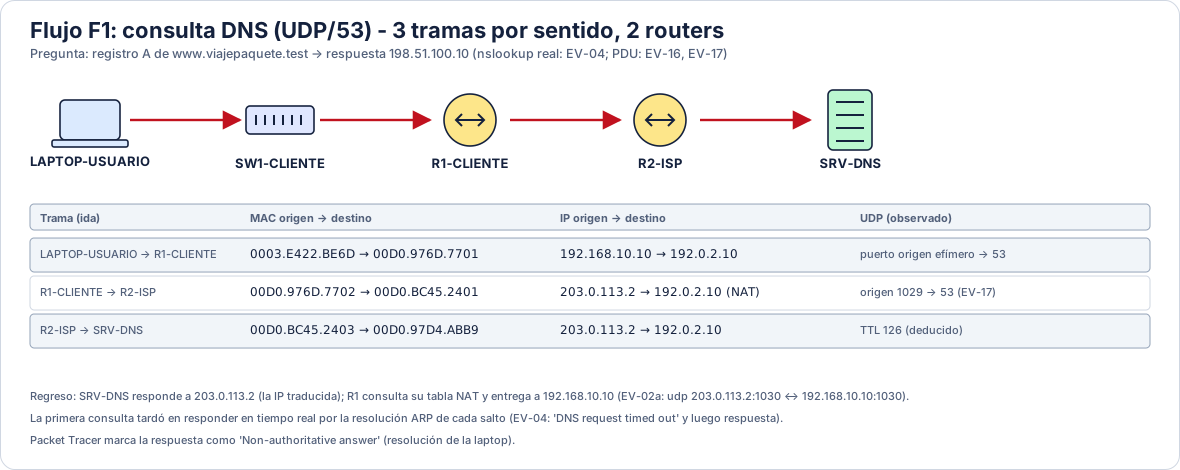
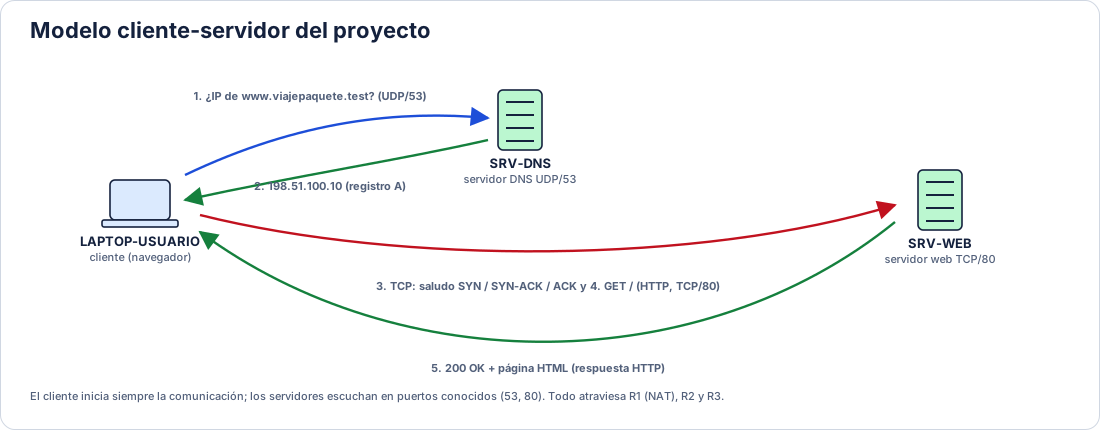
El Sistema de Nombres de Dominio traduce nombres a direcciones. El cliente envía una consulta UDP al puerto 53 y recibe un registro A con la IP (Mockapetris, 1987).
La laptop pregunta a SRV-DNS (192.0.2.10) por www.viajepaquete.test y recibe 198.51.100.10. Atraviesa R1 (donde se aplica NAT) y R2. Packet Tracer marca la respuesta como «Non-authoritative answer» en la laptop.
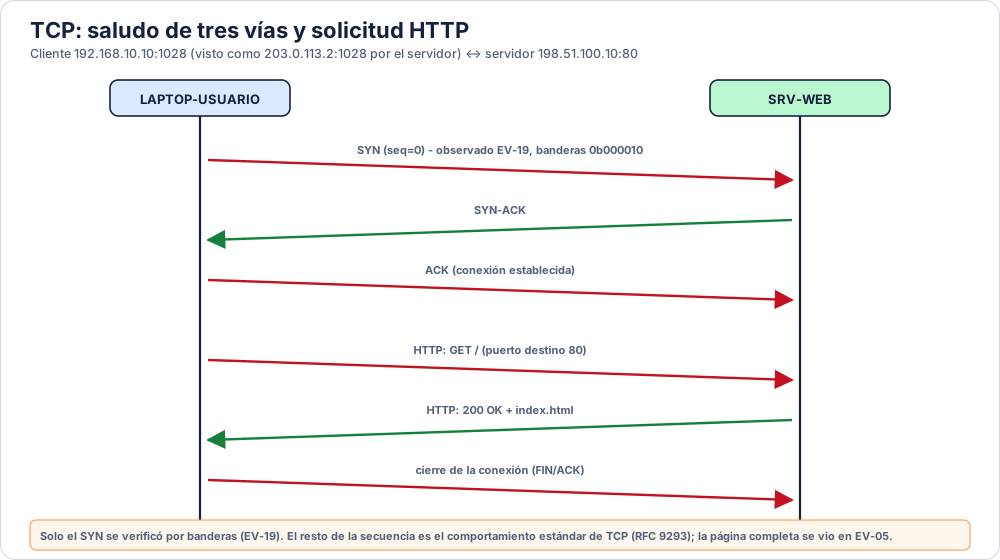
UDP envía mensajes sin establecer conexión y lo usa DNS (Postel, 1980). TCP abre una conexión con un saludo de tres vías (SYN, SYN-ACK, ACK) y garantiza entrega ordenada (Eddy, 2022). Los puertos identifican la aplicación en cada extremo.
La solicitud web usa TCP desde el puerto 1028 de la laptop hacia el puerto 80 de SRV-WEB. R1 conserva el puerto al traducir. DNS usa UDP hacia el puerto 53.
IPv4 identifica origen y destino (Postel, 1981a). Cada router resta 1 al TTL y descarta el paquete si llega a 0, lo que evita ciclos. ICMP (Postel, 1981b) es el protocolo detrás de ping y tracert.
La laptop envía con TTL 128. Al pasar por R1, R2 y R3 llega con 125. La red del cliente es privada (192.168.10.0/24, RFC 1918) y el resto usa direcciones de documentación.
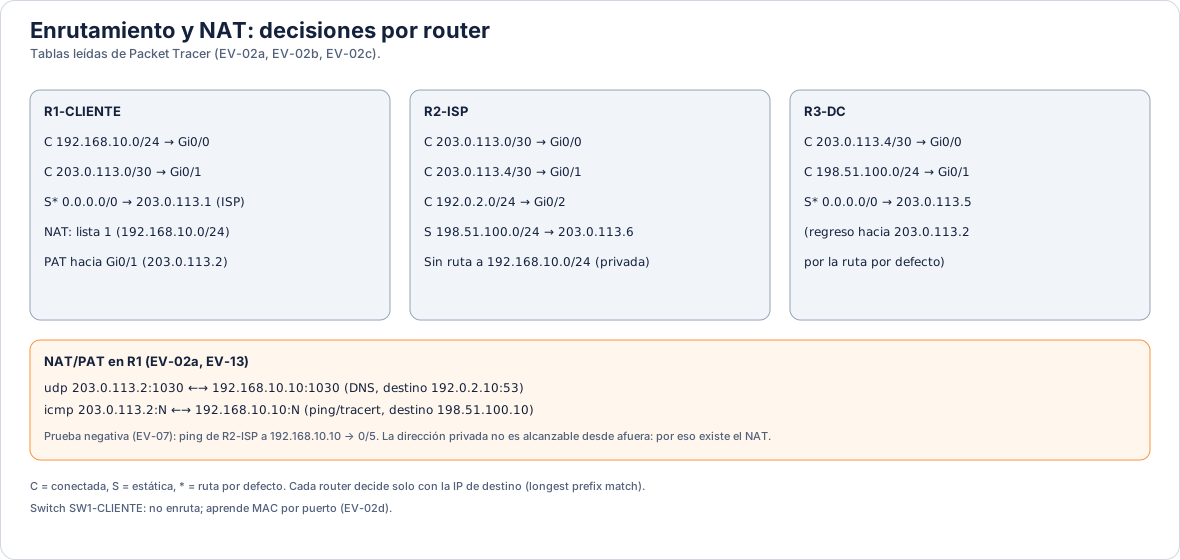
La dirección MAC identifica una interfaz dentro de su red local. Una trama Ethernet solo existe entre dos vecinos: cada router la descarta y crea otra con MAC distintas. El switch reenvía por MAC y no modifica ni la trama ni la IP.
Un mismo paquete de la laptop a SRV-WEB viaja en cuatro tramas con pares de MAC diferentes. La IP de destino 198.51.100.10 no cambia en ninguna.
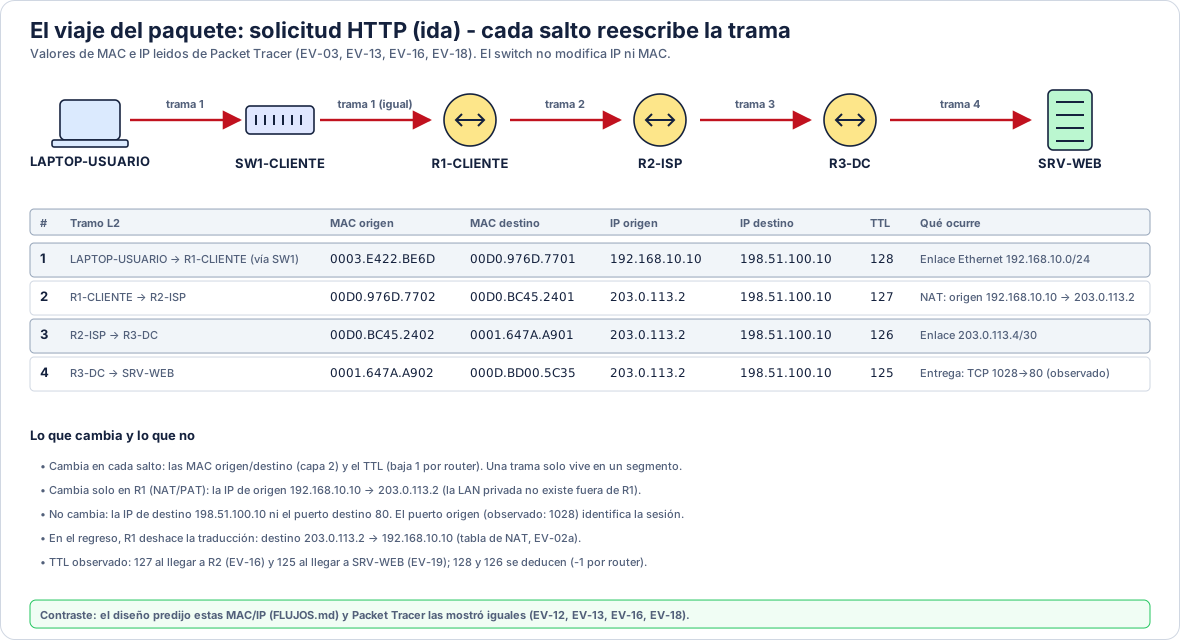
Las direcciones privadas (RFC 1918) no se enrutan en Internet. NAT las traduce a una dirección pública; PAT, una variante, también traduce el puerto para que muchos equipos compartan una sola IP (Srisuresh y Egevang, 2001).
R1 traduce 192.168.10.0/24 hacia la IP de su interfaz externa, 203.0.113.2 (ip nat inside source list 1 interface GigabitEthernet0/1 overload). Hacia fuera, la laptop se ve como 203.0.113.2.
HTTP define el mensaje con el que el navegador pide un recurso (GET) y la respuesta con su código (200 OK) y el contenido (Fielding et al., 2022). Viaja sobre una conexión TCP.
El navegador de la laptop pide http://www.viajepaquete.test y SRV-WEB responde con su index.html personalizada, puerto 80.
Encapsulamiento
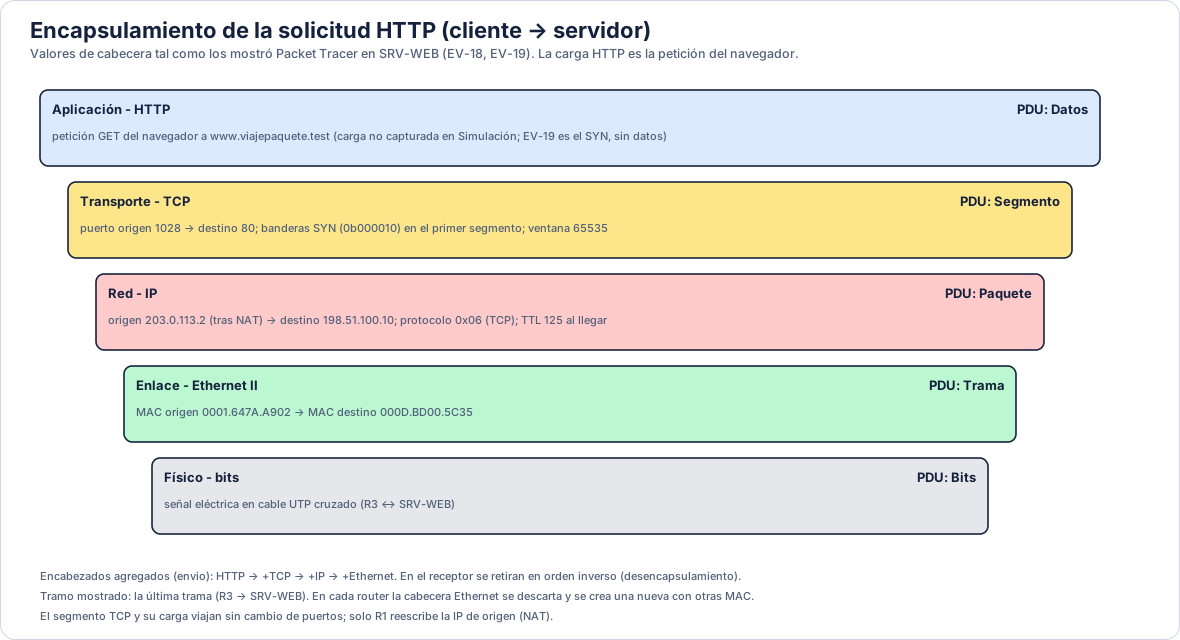
El mensaje HTTP se envuelve en un segmento TCP, luego en un paquete IP y por último en una trama Ethernet. El receptor abre los sobres en orden inverso. La figura usa los valores de la última trama de la ida, la que entrega R3 a SRV-WEB.
Dispositivos
Laptop-PT, 192.168.10.10/24. Pregunta a DNS, abre la conexión TCP y pide la página. Guarda una tabla ARP con la MAC de su gateway.
Catalyst 2960-24TT. Trabaja en capa 2: aprende MAC por puerto y reenvía tramas. No tiene IP y no enruta. Su tabla MAC está en EV-02d.
Cisco 2911. Separa la red privada del resto, aplica PAT y envía todo lo desconocido a R2 con una ruta por defecto.
Cisco 2911. Representa al proveedor: conecta con R1, R3 y el servidor DNS. Tiene una ruta estática a 198.51.100.0/24 y ninguna a la red privada.
Cisco 2911. Entrega el tráfico a SRV-WEB y devuelve las respuestas a R2 con una ruta por defecto.
SRV-DNS (192.0.2.10) responde consultas UDP 53 con un registro A. SRV-WEB (198.51.100.10) sirve una página HTTP en el puerto 80.
Un salto es un router cruzado. Hacia el servidor web son tres (R1, R2 y R3) y tracert los cuenta como cuatro líneas porque la última es el destino. En cada salto el router mira solo la IP de destino, elige la ruta con el prefijo más específico y reenvía por la interfaz correspondiente.
Topología
Una sola fuente de datos alimenta Packet Tracer, estos diagramas, la animación, el informe y la presentación. Si un valor cambia, cambia en todos.
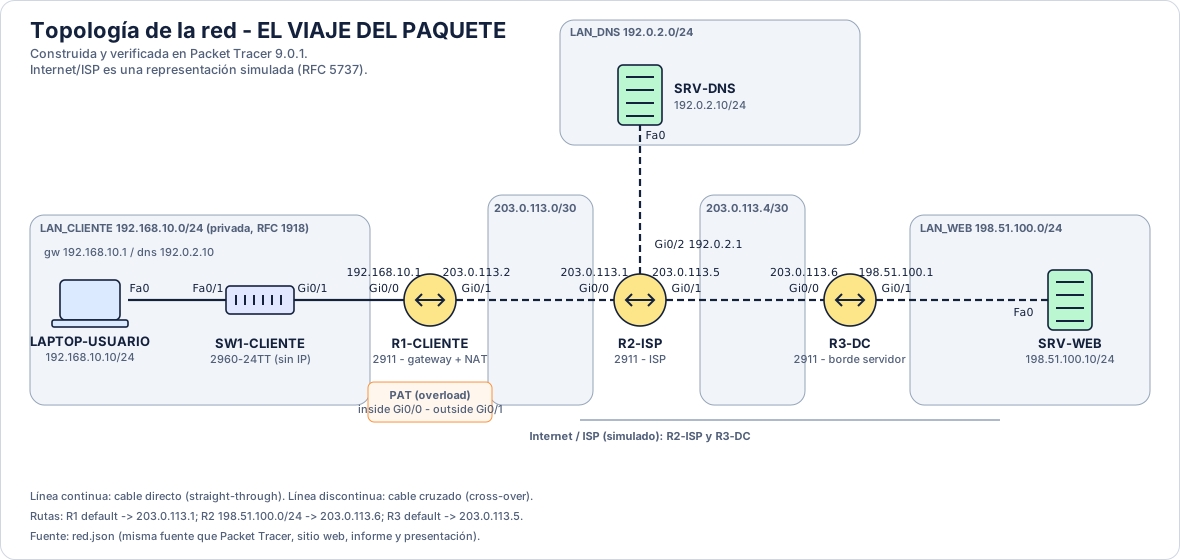
| Dispositivo | Interfaz | IP / prefijo | MAC (leída de Packet Tracer) |
|---|---|---|---|
| LAPTOP-USUARIO | FastEthernet0 | 192.168.10.10/24 | 0003.E422.BE6D |
| SW1-CLIENTE | FastEthernet0/1 | sin IP (capa 2) | 0007.EC94.7301 |
| SW1-CLIENTE | GigabitEthernet0/1 | sin IP (capa 2) | 0007.EC94.7319 |
| R1-CLIENTE | GigabitEthernet0/0 | 192.168.10.1/24 | 00D0.976D.7701 |
| R1-CLIENTE | GigabitEthernet0/1 | 203.0.113.2/30 | 00D0.976D.7702 |
| R2-ISP | GigabitEthernet0/0 | 203.0.113.1/30 | 00D0.BC45.2401 |
| R2-ISP | GigabitEthernet0/1 | 203.0.113.5/30 | 00D0.BC45.2402 |
| R2-ISP | GigabitEthernet0/2 | 192.0.2.1/24 | 00D0.BC45.2403 |
| R3-DC | GigabitEthernet0/0 | 203.0.113.6/30 | 0001.647A.A901 |
| R3-DC | GigabitEthernet0/1 | 198.51.100.1/24 | 0001.647A.A902 |
| SRV-DNS | FastEthernet0 | 192.0.2.10/24 | 00D0.97D4.ABB9 |
| SRV-WEB | FastEthernet0 | 198.51.100.10/24 | 000D.BD00.5C35 |
| Router | Destino | Siguiente salto | Nota |
|---|---|---|---|
| R1-CLIENTE | 0.0.0.0/0 | 203.0.113.1 | Ruta por defecto hacia el ISP. |
| R2-ISP | 198.51.100.0/24 | 203.0.113.6 | Hacia la red del servidor web via R3. |
| R3-DC | 0.0.0.0/0 | 203.0.113.5 | Ruta por defecto de regreso hacia el ISP. |
| R1-CLIENTE | 192.168.10.0/24 | GigabitEthernet0/1 | PAT (overload) hacia la IP de la interfaz externa; inside GigabitEthernet0/0 |
Packet Tracer
El archivo El_Viaje_del_Paquete.pkt contiene la red ya configurada. Descargar el archivo .pkt.
ping 198.51.100.10, nslookup www.viajepaquete.test y tracert 198.51.100.10.http://www.viajepaquete.test.Los primeros paquetes pueden perderse mientras se resuelve ARP en cada salto; repite el comando y responde.
enable
configure terminal
hostname R1-CLIENTE
no ip domain-lookup
interface GigabitEthernet0/0
 description LAN-CLIENTE (inside) hacia SW1
 ip address 192.168.10.1 255.255.255.0
 ip nat inside
 no shutdown
 exit
interface GigabitEthernet0/1
 description ENLACE a R2-ISP (outside)
 ip address 203.0.113.2 255.255.255.252
 ip nat outside
 no shutdown
 exit
ip route 0.0.0.0 0.0.0.0 203.0.113.1
access-list 1 permit 192.168.10.0 0.0.0.255
ip nat inside source list 1 interface GigabitEthernet0/1 overload
end
write memory
enable
configure terminal
hostname R2-ISP
no ip domain-lookup
interface GigabitEthernet0/0
 description ENLACE a R1-CLIENTE
 ip address 203.0.113.1 255.255.255.252
 no shutdown
 exit
interface GigabitEthernet0/1
 description ENLACE a R3-DC
 ip address 203.0.113.5 255.255.255.252
 no shutdown
 exit
interface GigabitEthernet0/2
 description LAN-DNS hacia SRV-DNS
 ip address 192.0.2.1 255.255.255.0
 no shutdown
 exit
ip route 198.51.100.0 255.255.255.0 203.0.113.6
end
write memory
enable
configure terminal
hostname R3-DC
no ip domain-lookup
interface GigabitEthernet0/0
 description ENLACE a R2-ISP
 ip address 203.0.113.6 255.255.255.252
 no shutdown
 exit
interface GigabitEthernet0/1
 description LAN-WEB hacia SRV-WEB
 ip address 198.51.100.1 255.255.255.0
 no shutdown
 exit
ip route 0.0.0.0 0.0.0.0 203.0.113.5
end
write memory
enable
configure terminal
hostname SW1-CLIENTE
no ip domain-lookup
interface FastEthernet0/1
 description hacia LAPTOP-USUARIO
 no shutdown
 exit
interface GigabitEthernet0/1
 description hacia R1-CLIENTE
 no shutdown
 exit
end
write memory
Evidencias
Capturas de pantalla y resultados de comandos obtenidos el 02/10/2026. Pulsa una imagen para ampliarla.
Los siete dispositivos conectados y con enlaces activos.
La página de SRV-WEB cargada desde www.viajepaquete.test.
Lista parcial de eventos con ARP seguido de ICMP.
Recorrido ICMP completo, evento por evento.
El origen ya es 203.0.113.2: R1 aplicó la traducción.
Cambio de MAC y de IP de origen al pasar por R1.
PDU ARP recibida por SW1-CLIENTE.
Eventos DNS (UDP) y TCP en la lista de la simulación.
PDU de la consulta DNS al llegar a R2.
Detalle de la PDU entrante: puertos y TTL 127.
Capas de la PDU al llegar al servidor: puertos, IP y MAC.
Encabezados IP y TCP: TTL 125, SYN 0b000010, ventana 65535.
===== R1-CLIENTE# show running-config =====
show running-config
Building configuration...

Current configuration : 1008 bytes
!
version 15.1
no service timestamps log datetime msec
no service timestamps debug datetime msec
no service password-encryption
!
hostname R1-CLIENTE
!
!
!
!
!
!
!
!
ip cef
no ipv6 cef
!
!
!
!
license udi pid CISCO2911/K9 sn FTX15242OLM-
!
!
!
!
!
!
!
!
!
!
!
no ip domain-lookup
!
!
spanning-tree mode pvst
!
!
!
!
!
!
interface GigabitEthernet0/0
 description LAN-CLIENTE (inside) hacia SW1
 ip address 192.168.10.1 255.255.255.0
 ip nat inside
 duplex auto
 speed auto
!
interface GigabitEthernet0/1
 description ENLACE a R2-ISP (outside)
 ip address 203.0.113.2 255.255.255.252
 ip nat outside
 duplex auto
 speed auto
!
interface GigabitEthernet0/2
 no ip address
 duplex auto
 speed auto
 shutdown
!
interface Vlan1
 no ip address
 shutdown
!
ip nat inside source list 1 interface GigabitEthernet0/1 overload
ip classless
ip route 0.0.0.0 0.0.0.0 203.0.113.1
!
ip flow-export version 9
!
!
access-list 1 permit 192.168.10.0 0.0.0.255
!
!
!
!
!
line con 0
!
line aux 0
!
line vty 0 4
 login
!
!
!
end


R1-CLIENTE#
R1-CLIENTE#

===== R1-CLIENTE# show ip interface brief =====
show ip interface brief
Interface              IP-Address      OK? Method Status                Protocol
GigabitEthernet0/0     192.168.10.1    YES manual up                    up
GigabitEthernet0/1     203.0.113.2     YES manual up                    up
GigabitEthernet0/2     unassigned      YES unset  administratively down down
Vlan1                  unassigned      YES unset  administratively down down
R1-CLIENTE#

===== R1-CLIENTE# show ip route =====
show ip route
Codes: L - local, C - connected, S - static, R - RIP, M - mobile, B - BGP
       D - EIGRP, EX - EIGRP external, O - OSPF, IA - OSPF inter area
       N1 - OSPF NSSA external type 1, N2 - OSPF NSSA external type 2
       E1 - OSPF external type 1, E2 - OSPF external type 2, E - EGP
       i - IS-IS, L1 - IS-IS level-1, L2 - IS-IS level-2, ia - IS-IS inter area
       * - candidate default, U - per-user static route, o - ODR
       P - periodic downloaded static route

Gateway of last resort is 203.0.113.1 to network 0.0.0.0

     192.168.10.0/24 is variably subnetted, 2 subnets, 2 masks
C       192.168.10.0/24 is directly connected, GigabitEthernet0/0
L       192.168.10.1/32 is directly connected, GigabitEthernet0/0
     203.0.113.0/24 is variably subnetted, 2 subnets, 2 masks
C       203.0.113.0/30 is directly connected, GigabitEthernet0/1
L       203.0.113.2/32 is directly connected, GigabitEthernet0/1
S*   0.0.0.0/0 [1/0] via 203.0.113.1

R1-CLIENTE#

===== R1-CLIENTE# show arp =====
show arp
Protocol  Address          Age (min)  Hardware Addr   Type   Interface
Internet  192.168.10.1            -   00D0.976D.7701  ARPA   GigabitEthernet0/0
Internet  192.168.10.10           0   0003.E422.BE6D  ARPA   GigabitEthernet0/0
Internet  203.0.113.1             0   00D0.BC45.2401  ARPA   GigabitEthernet0/1
Internet  203.0.113.2             -   00D0.976D.7702  ARPA   GigabitEthernet0/1
R1-CLIENTE#

===== R1-CLIENTE# show interfaces =====
show interfaces
GigabitEthernet0/0 is up, line protocol is up (connected)
  Hardware is CN Gigabit Ethernet, address is 00d0.976d.7701 (bia 00d0.976d.7701)
  Description: LAN-CLIENTE (inside) hacia SW1
  Internet address is 192.168.10.1/24
  MTU 1500 bytes, BW 1000000 Kbit, DLY 10 usec,
     reliability 255/255, txload 1/255, rxload 1/255
  Encapsulation ARPA, loopback not set
  Keepalive set (10 sec)
  Full Duplex, 100Mbps, link type is auto, media type is RJ45
  output flow-control is unsupported, input flow-control is unsupported
  ARP type: ARPA, ARP Timeout 04:00:00,
  Last input 00:00:08, output 00:00:05, output hang never
  Last clearing of "show interface" counters never
  Input queue: 0/75/0 (size/max/drops); Total output drops: 0
  Queueing strategy: fifo
  Output queue :0/40 (size/max)
  5 minute input rate 17 bits/sec, 0 packets/sec
  5 minute output rate 20 bits/sec, 0 packets/sec
     62 packets input, 3817 bytes, 0 no buffer
     Received 0 broadcasts, 0 runts, 0 giants, 0 throttles
     0 input errors, 0 CRC, 0 frame, 0 overrun, 0 ignored, 0 abort
     0 watchdog, 1017 multicast, 0 pause input
     0 input packets with dribble condition detected
     52 packets output, 3906 bytes, 0 underruns
     0 output errors, 0 collisions, 1 interface resets
     0 unknown protocol drops
     0 babbles, 0 late collision, 0 deferred
     0 lost carrier, 0 no carrier
     0 output buffer failures, 0 output buffers swapped out
GigabitEthernet0/1 is up, line protocol is up (connected)
  Hardware is CN Gigabit Ethernet, address is 00d0.976d.7702 (bia 00d0.976d.7702)
  Description: ENLACE a R2-ISP (outside)
  Internet address is 203.0.113.2/30
  MTU 1500 bytes, BW 1000000 Kbit, DLY 10 usec,
     reliability 255/255, txload 1/255, rxload 1/255
  Encapsulation ARPA, loopback not set
  Keepalive set (10 sec)
  Full Duplex, 100Mbps, link type is auto, media type is RJ45
  output flow-control is unsupported, input flow-control is unsupported
  ARP type: ARPA, ARP Timeout 04:00:00,
  Last input 00:00:08, output 00:00:05, output hang never
  Last clearing of "show interface" counters never
  Input queue: 0/75/0 (size/max/drops); Total output drops: 0
  Queueing strategy: fifo
  Output queue :0/40 (size/max)
  5 minute input rate 20 bits/sec, 0 packets/sec
  5 minute output rate 17 bits/sec, 0 packets/sec
     39 packets input, 2674 bytes, 0 no buffer
     Received 0 broadcasts, 0 runts, 0 giants, 0 throttles
     0 input errors, 0 CRC, 0 frame, 0 overrun, 0 ignored, 0 abort
     0 watchdog, 1017 multicast, 0 pause input
     0 input packets with dribble condition detected
     48 packets output, 2688 bytes, 0 underruns
     0 output errors, 0 collisions, 1 interface resets
     0 unknown protocol drops
     0 babbles, 0 late collision, 0 deferred
     0 lost carrier, 0 no carrier
     0 output buffer failures, 0 output buffers swapped out
GigabitEthernet0/2 is administratively down, line protocol is down (disabled)
  Hardware is CN Gigabit Ethernet, address is 00d0.976d.7703 (bia 00d0.976d.7703)
  MTU 1500 bytes, BW 1000000 Kbit, DLY 10 usec,
     reliability 255/255, txload 1/255, rxload 1/255
  Encapsulation ARPA, loopback not set
  Keepalive set (10 sec)
  Half Duplex, 100Mbps, link type is auto, media type is RJ45
  output flow-control is unsupported, input flow-control is unsupported
  ARP type: ARPA, ARP Timeout 04:00:00,
  Last input 00:00:08, output 00:00:05, output hang never
  Last clearing of "show interface" counters never
  Input queue: 0/75/0 (size/max/drops); Total output drops: 0
  Queueing strategy: fifo
  Output queue :0/40 (size/max)
  5 minute input rate 0 bits/sec, 0 packets/sec
  5 minute output rate 0 bits/sec, 0 packets/sec
     0 packets input, 0 bytes, 0 no buffer
     Received 0 broadcasts, 0 runts, 0 giants, 0 throttles
     0 input errors, 0 CRC, 0 frame, 0 overrun, 0 ignored, 0 abort
     0 watchdog, 1017 multicast, 0 pause input
     0 input packets with dribble condition detected
     0 packets output, 0 bytes, 0 underruns
     0 output errors, 0 collisions, 1 interface resets
     0 unknown protocol drops
     0 babbles, 0 late collision, 0 deferred
     0 lost carrier, 0 no carrier
     0 output buffer failures, 0 output buffers swapped out
Vlan1 is administratively down, line protocol is down
  Hardware is CPU Interface, address is 0030.a382.d669 (bia 0030.a382.d669)
  MTU 1500 bytes, BW 100000 Kbit, DLY 1000000 usec,
     reliability 255/255, txload 1/255, rxload 1/255
  Encapsulation ARPA, loopback not set
  ARP type: ARPA, ARP Timeout 04:00:00
  Last input 21:40:21, output never, output hang never
  Last clearing of "show interface" counters never
  Input queue: 0/75/0/0 (size/max/drops/flushes); Total output drops: 0
  Queueing strategy: fifo
  Output queue: 0/40 (size/max)
  5 minute input rate 0 bits/sec, 0 packets/sec
  5 minute output rate 0 bits/sec, 0 packets/sec
     1682 packets input, 530955 bytes, 0 no buffer
     Received 0 broadcasts (0 IP multicast)
     0 runts, 0 giants, 0 throttles
     0 input errors, 0 CRC, 0 frame, 0 overrun, 0 ignored
     563859 packets output, 0 bytes, 0 underruns
     0 output errors, 23 interface resets
     0 output buffer failures, 0 output buffers swapped out

R1-CLIENTE#
R1-CLIENTE#

===== R1-CLIENTE# show cdp neighbors =====
show cdp neighbors
Capability Codes: R - Router, T - Trans Bridge, B - Source Route Bridge
                  S - Switch, H - Host, I - IGMP, r - Repeater, P - Phone
Device ID    Local Intrfce   Holdtme    Capability   Platform    Port ID
R2-ISP       Gig 0/1          176            R       C2900       Gig 0/0
SW1-CLIENTE  Gig 0/0          176            S       2960        Gig 0/1
R1-CLIENTE#

===== R1-CLIENTE# show ip nat translations =====
show ip nat translations
Pro  Inside global     Inside local       Outside local      Outside global
icmp 203.0.113.2:26    192.168.10.10:26   198.51.100.10:26   198.51.100.10:26
icmp 203.0.113.2:27    192.168.10.10:27   198.51.100.10:27   198.51.100.10:27
icmp 203.0.113.2:28    192.168.10.10:28   198.51.100.10:28   198.51.100.10:28
icmp 203.0.113.2:29    192.168.10.10:29   198.51.100.10:29   198.51.100.10:29
icmp 203.0.113.2:33    192.168.10.10:33   198.51.100.10:33   198.51.100.10:33
icmp 203.0.113.2:34    192.168.10.10:34   198.51.100.10:34   198.51.100.10:34
icmp 203.0.113.2:35    192.168.10.10:35   198.51.100.10:35   198.51.100.10:35
icmp 203.0.113.2:36    192.168.10.10:36   198.51.100.10:36   198.51.100.10:36
icmp 203.0.113.2:37    192.168.10.10:37   198.51.100.10:37   198.51.100.10:37
icmp 203.0.113.2:38    192.168.10.10:38   198.51.100.10:38   198.51.100.10:38
icmp 203.0.113.2:39    192.168.10.10:39   198.51.100.10:39   198.51.100.10:39
icmp 203.0.113.2:40    192.168.10.10:40   198.51.100.10:40   198.51.100.10:40
icmp 203.0.113.2:41    192.168.10.10:41   198.51.100.10:41   198.51.100.10:41
udp 203.0.113.2:1030   192.168.10.10:1030 192.0.2.10:53      192.0.2.10:53

R1-CLIENTE#

===== R1-CLIENTE# show ip nat statistics =====
show ip nat statistics
Total translations: 14 (0 static, 14 dynamic, 14 extended)
Outside Interfaces: GigabitEthernet0/1
Inside Interfaces: GigabitEthernet0/0
Hits: 50  Misses: 38
Expired translations: 17
Dynamic mappings:
R1-CLIENTE#
===== R2-ISP# show running-config =====
show running-config
Building configuration...

Current configuration : 899 bytes
!
version 15.1
no service timestamps log datetime msec
no service timestamps debug datetime msec
no service password-encryption
!
hostname R2-ISP
!
!
!
!
!
!
!
!
ip cef
no ipv6 cef
!
!
!
!
license udi pid CISCO2911/K9 sn FTX1524V4C9-
!
!
!
!
!
!
!
!
!
!
!
no ip domain-lookup
!
!
spanning-tree mode pvst
!
!
!
!
!
!
interface GigabitEthernet0/0
 description ENLACE a R1-CLIENTE
 ip address 203.0.113.1 255.255.255.252
 duplex auto
 speed auto
!
interface GigabitEthernet0/1
 description ENLACE a R3-DC
 ip address 203.0.113.5 255.255.255.252
 duplex auto
 speed auto
!
interface GigabitEthernet0/2
 description LAN-DNS hacia SRV-DNS
 ip address 192.0.2.1 255.255.255.0
 duplex auto
 speed auto
!
interface Vlan1
 no ip address
 shutdown
!
ip classless
ip route 198.51.100.0 255.255.255.0 203.0.113.6
!
ip flow-export version 9
!
!
!
!
!
!
!
line con 0
!
line aux 0
!
line vty 0 4
 login
!
!
!
end


R2-ISP#

===== R2-ISP# show ip interface brief =====
show ip interface brief
Interface              IP-Address      OK? Method Status                Protocol
GigabitEthernet0/0     203.0.113.1     YES manual up                    up
GigabitEthernet0/1     203.0.113.5     YES manual up                    up
GigabitEthernet0/2     192.0.2.1       YES manual up                    up
Vlan1                  unassigned      YES unset  administratively down down
R2-ISP#

===== R2-ISP# show ip route =====
show ip route
Codes: L - local, C - connected, S - static, R - RIP, M - mobile, B - BGP
       D - EIGRP, EX - EIGRP external, O - OSPF, IA - OSPF inter area
       N1 - OSPF NSSA external type 1, N2 - OSPF NSSA external type 2
       E1 - OSPF external type 1, E2 - OSPF external type 2, E - EGP
       i - IS-IS, L1 - IS-IS level-1, L2 - IS-IS level-2, ia - IS-IS inter area
       * - candidate default, U - per-user static route, o - ODR
       P - periodic downloaded static route

Gateway of last resort is not set

     192.0.2.0/24 is variably subnetted, 2 subnets, 2 masks
C       192.0.2.0/24 is directly connected, GigabitEthernet0/2
L       192.0.2.1/32 is directly connected, GigabitEthernet0/2
S    198.51.100.0/24 [1/0] via 203.0.113.6
     203.0.113.0/24 is variably subnetted, 4 subnets, 2 masks
C       203.0.113.0/30 is directly connected, GigabitEthernet0/0
L       203.0.113.1/32 is directly connected, GigabitEthernet0/0
C       203.0.113.4/30 is directly connected, GigabitEthernet0/1
L       203.0.113.5/32 is directly connected, GigabitEthernet0/1

R2-ISP#

===== R2-ISP# show arp =====
show arp
Protocol  Address          Age (min)  Hardware Addr   Type   Interface
Internet  192.0.2.1               -   00D0.BC45.2403  ARPA   GigabitEthernet0/2
Internet  192.0.2.10              0   00D0.97D4.ABB9  ARPA   GigabitEthernet0/2
Internet  203.0.113.1             -   00D0.BC45.2401  ARPA   GigabitEthernet0/0
Internet  203.0.113.2             0   00D0.976D.7702  ARPA   GigabitEthernet0/0
Internet  203.0.113.5             -   00D0.BC45.2402  ARPA   GigabitEthernet0/1
Internet  203.0.113.6             0   0001.647A.A901  ARPA   GigabitEthernet0/1
R2-ISP#

===== R2-ISP# show interfaces =====
show interfaces
GigabitEthernet0/0 is up, line protocol is up (connected)
  Hardware is CN Gigabit Ethernet, address is 00d0.bc45.2401 (bia 00d0.bc45.2401)
  Description: ENLACE a R1-CLIENTE
  Internet address is 203.0.113.1/30
  MTU 1500 bytes, BW 1000000 Kbit, DLY 10 usec,
     reliability 255/255, txload 1/255, rxload 1/255
  Encapsulation ARPA, loopback not set
  Keepalive set (10 sec)
  Full Duplex, 100Mbps, link type is auto, media type is RJ45
  output flow-control is unsupported, input flow-control is unsupported
  ARP type: ARPA, ARP Timeout 04:00:00,
  Last input 00:00:08, output 00:00:05, output hang never
  Last clearing of "show interface" counters never
  Input queue: 0/75/0 (size/max/drops); Total output drops: 0
  Queueing strategy: fifo
  Output queue :0/40 (size/max)
  5 minute input rate 17 bits/sec, 0 packets/sec
  5 minute output rate 20 bits/sec, 0 packets/sec
     48 packets input, 2688 bytes, 0 no buffer
     Received 0 broadcasts, 0 runts, 0 giants, 0 throttles
     0 input errors, 0 CRC, 0 frame, 0 overrun, 0 ignored, 0 abort
     0 watchdog, 1017 multicast, 0 pause input
     0 input packets with dribble condition detected
     39 packets output, 2674 bytes, 0 underruns
     0 output errors, 0 collisions, 1 interface resets
     0 unknown protocol drops
     0 babbles, 0 late collision, 0 deferred
     0 lost carrier, 0 no carrier
     0 output buffer failures, 0 output buffers swapped out
GigabitEthernet0/1 is up, line protocol is up (connected)
  Hardware is CN Gigabit Ethernet, address is 00d0.bc45.2402 (bia 00d0.bc45.2402)
  Description: ENLACE a R3-DC
  Internet address is 203.0.113.5/30
  MTU 1500 bytes, BW 1000000 Kbit, DLY 10 usec,
     reliability 255/255, txload 1/255, rxload 1/255
  Encapsulation ARPA, loopback not set
  Keepalive set (10 sec)
  Full Duplex, 100Mbps, link type is auto, media type is RJ45
  output flow-control is unsupported, input flow-control is unsupported
  ARP type: ARPA, ARP Timeout 04:00:00,
  Last input 00:00:08, output 00:00:05, output hang never
  Last clearing of "show interface" counters never
  Input queue: 0/75/0 (size/max/drops); Total output drops: 0
  Queueing strategy: fifo
  Output queue :0/40 (size/max)
  5 minute input rate 17 bits/sec, 0 packets/sec
  5 minute output rate 15 bits/sec, 0 packets/sec
     27 packets input, 1738 bytes, 0 no buffer
     Received 0 broadcasts, 0 runts, 0 giants, 0 throttles
     0 input errors, 0 CRC, 0 frame, 0 overrun, 0 ignored, 0 abort
     0 watchdog, 1017 multicast, 0 pause input
     0 input packets with dribble condition detected
     34 packets output, 1937 bytes, 0 underruns
     0 output errors, 0 collisions, 1 interface resets
     0 unknown protocol drops
     0 babbles, 0 late collision, 0 deferred
     0 lost carrier, 0 no carrier
     0 output buffer failures, 0 output buffers swapped out
GigabitEthernet0/2 is up, line protocol is up (connected)
  Hardware is CN Gigabit Ethernet, address is 00d0.bc45.2403 (bia 00d0.bc45.2403)
  Description: LAN-DNS hacia SRV-DNS
  Internet address is 192.0.2.1/24
  MTU 1500 bytes, BW 100000 Kbit, DLY 100 usec,
     reliability 255/255, txload 1/255, rxload 1/255
  Encapsulation ARPA, loopback not set
  Keepalive set (10 sec)
  Full Duplex, 100Mbps, link type is auto, media type is RJ45
  output flow-control is unsupported, input flow-control is unsupported
  ARP type: ARPA, ARP Timeout 04:00:00,
  Last input 00:00:08, output 00:00:05, output hang never
  Last clearing of "show interface" counters never
  Input queue: 0/75/0 (size/max/drops); Total output drops: 0
  Queueing strategy: fifo
  Output queue :0/40 (size/max)
  5 minute input rate 2 bits/sec, 0 packets/sec
  5 minute output rate 1 bits/sec, 0 packets/sec
     6 packets input, 600 bytes, 0 no buffer
     Received 0 broadcasts, 0 runts, 0 giants, 0 throttles
     0 input errors, 0 CRC, 0 frame, 0 overrun, 0 ignored, 0 abort
     0 watchdog, 1017 multicast, 0 pause input
     0 input packets with dribble condition detected
     6 packets output, 390 bytes, 0 underruns
     0 output errors, 0 collisions, 1 interface resets
     0 unknown protocol drops
     0 babbles, 0 late collision, 0 deferred
     0 lost carrier, 0 no carrier
     0 output buffer failures, 0 output buffers swapped out
Vlan1 is administratively down, line protocol is down
  Hardware is CPU Interface, address is 00e0.8f93.4ed8 (bia 00e0.8f93.4ed8)
  MTU 1500 bytes, BW 100000 Kbit, DLY 1000000 usec,
     reliability 255/255, txload 1/255, rxload 1/255
  Encapsulation ARPA, loopback not set
  ARP type: ARPA, ARP Timeout 04:00:00
  Last input 21:40:21, output never, output hang never
  Last clearing of "show interface" counters never
  Input queue: 0/75/0/0 (size/max/drops/flushes); Total output drops: 0
  Queueing strategy: fifo
  Output queue: 0/40 (size/max)
  5 minute input rate 0 bits/sec, 0 packets/sec
  5 minute output rate 0 bits/sec, 0 packets/sec
     1682 packets input, 530955 bytes, 0 no buffer
     Received 0 broadcasts (0 IP multicast)
     0 runts, 0 giants, 0 throttles
     0 input errors, 0 CRC, 0 frame, 0 overrun, 0 ignored
     563859 packets output, 0 bytes, 0 underruns
     0 output errors, 23 interface resets
     0 output buffer failures, 0 output buffers swapped out

R2-ISP#
R2-ISP#

===== R2-ISP# show cdp neighbors =====
show cdp neighbors
Capability Codes: R - Router, T - Trans Bridge, B - Source Route Bridge
                  S - Switch, H - Host, I - IGMP, r - Repeater, P - Phone
Device ID    Local Intrfce   Holdtme    Capability   Platform    Port ID
R3-DC        Gig 0/1          176            R       C2900       Gig 0/0
R1-CLIENTE   Gig 0/0          176            R       C2900       Gig 0/1
R2-ISP#
===== R3-DC# show running-config =====
show running-config
Building configuration...

Current configuration : 843 bytes
!
version 15.1
no service timestamps log datetime msec
no service timestamps debug datetime msec
no service password-encryption
!
hostname R3-DC
!
!
!
!
!
!
!
!
ip cef
no ipv6 cef
!
!
!
!
license udi pid CISCO2911/K9 sn FTX1524HZ50-
!
!
!
!
!
!
!
!
!
!
!
no ip domain-lookup
!
!
spanning-tree mode pvst
!
!
!
!
!
!
interface GigabitEthernet0/0
 description ENLACE a R2-ISP
 ip address 203.0.113.6 255.255.255.252
 duplex auto
 speed auto
!
interface GigabitEthernet0/1
 description LAN-WEB hacia SRV-WEB
 ip address 198.51.100.1 255.255.255.0
 duplex auto
 speed auto
!
interface GigabitEthernet0/2
 no ip address
 duplex auto
 speed auto
 shutdown
!
interface Vlan1
 no ip address
 shutdown
!
ip classless
ip route 0.0.0.0 0.0.0.0 203.0.113.5
!
ip flow-export version 9
!
!
!
!
!
!
!
line con 0
!
line aux 0
!
line vty 0 4
 login
!
!
!
end


R3-DC#

===== R3-DC# show ip interface brief =====
show ip interface brief
Interface              IP-Address      OK? Method Status                Protocol
GigabitEthernet0/0     203.0.113.6     YES manual up                    up
GigabitEthernet0/1     198.51.100.1    YES manual up                    up
GigabitEthernet0/2     unassigned      YES unset  administratively down down
Vlan1                  unassigned      YES unset  administratively down down
R3-DC#

===== R3-DC# show ip route =====
show ip route
Codes: L - local, C - connected, S - static, R - RIP, M - mobile, B - BGP
       D - EIGRP, EX - EIGRP external, O - OSPF, IA - OSPF inter area
       N1 - OSPF NSSA external type 1, N2 - OSPF NSSA external type 2
       E1 - OSPF external type 1, E2 - OSPF external type 2, E - EGP
       i - IS-IS, L1 - IS-IS level-1, L2 - IS-IS level-2, ia - IS-IS inter area
       * - candidate default, U - per-user static route, o - ODR
       P - periodic downloaded static route

Gateway of last resort is 203.0.113.5 to network 0.0.0.0

     198.51.100.0/24 is variably subnetted, 2 subnets, 2 masks
C       198.51.100.0/24 is directly connected, GigabitEthernet0/1
L       198.51.100.1/32 is directly connected, GigabitEthernet0/1
     203.0.113.0/24 is variably subnetted, 2 subnets, 2 masks
C       203.0.113.4/30 is directly connected, GigabitEthernet0/0
L       203.0.113.6/32 is directly connected, GigabitEthernet0/0
S*   0.0.0.0/0 [1/0] via 203.0.113.5

R3-DC#

===== R3-DC# show arp =====
show arp
Protocol  Address          Age (min)  Hardware Addr   Type   Interface
Internet  198.51.100.1            -   0001.647A.A902  ARPA   GigabitEthernet0/1
Internet  198.51.100.10           0   000D.BD00.5C35  ARPA   GigabitEthernet0/1
Internet  203.0.113.5             0   00D0.BC45.2402  ARPA   GigabitEthernet0/0
Internet  203.0.113.6             -   0001.647A.A901  ARPA   GigabitEthernet0/0
R3-DC#

===== R3-DC# show interfaces =====

  Description: ENLACE a R2-ISP
  Internet address is 203.0.113.6/30
  MTU 1500 bytes, BW 1000000 Kbit, DLY 10 usec,
     reliability 255/255, txload 1/255, rxload 1/255
  Encapsulation ARPA, loopback not set
  Keepalive set (10 sec)
  Full Duplex, 100Mbps, link type is auto, media type is RJ45
  output flow-control is unsupported, input flow-control is unsupported
  ARP type: ARPA, ARP Timeout 04:00:00,
  Last input 00:00:08, output 00:00:05, output hang never
  Last clearing of "show interface" counters never
  Input queue: 0/75/0 (size/max/drops); Total output drops: 0
  Queueing strategy: fifo
  Output queue :0/40 (size/max)
  5 minute input rate 15 bits/sec, 0 packets/sec
  5 minute output rate 17 bits/sec, 0 packets/sec
     34 packets input, 1937 bytes, 0 no buffer
     Received 0 broadcasts, 0 runts, 0 giants, 0 throttles
     0 input errors, 0 CRC, 0 frame, 0 overrun, 0 ignored, 0 abort
     0 watchdog, 1017 multicast, 0 pause input
     0 input packets with dribble condition detected
     27 packets output, 1738 bytes, 0 underruns
     0 output errors, 0 collisions, 1 interface resets
     0 unknown protocol drops
     0 babbles, 0 late collision, 0 deferred
     0 lost carrier, 0 no carrier
     0 output buffer failures, 0 output buffers swapped out
GigabitEthernet0/1 is up, line protocol is up (connected)
  Hardware is CN Gigabit Ethernet, address is 0001.647a.a902 (bia 0001.647a.a902)
  Description: LAN-WEB hacia SRV-WEB
  Internet address is 198.51.100.1/24
  MTU 1500 bytes, BW 100000 Kbit, DLY 100 usec,
     reliability 255/255, txload 1/255, rxload 1/255
  Encapsulation ARPA, loopback not set
  Keepalive set (10 sec)
  Full Duplex, 100Mbps, link type is auto, media type is RJ45
  output flow-control is unsupported, input flow-control is unsupported
  ARP type: ARPA, ARP Timeout 04:00:00,
  Last input 00:00:08, output 00:00:05, output hang never
  Last clearing of "show interface" counters never
  Input queue: 0/75/0 (size/max/drops); Total output drops: 0
  Queueing strategy: fifo
  Output queue :0/40 (size/max)
  5 minute input rate 14 bits/sec, 0 packets/sec
  5 minute output rate 14 bits/sec, 0 packets/sec
     21 packets input, 1402 bytes, 0 no buffer
     Received 0 broadcasts, 0 runts, 0 giants, 0 throttles
     0 input errors, 0 CRC, 0 frame, 0 overrun, 0 ignored, 0 abort
     0 watchdog, 1017 multicast, 0 pause input
     0 input packets with dribble condition detected
     27 packets output, 1641 bytes, 0 underruns
     0 output errors, 0 collisions, 1 interface resets
     0 unknown protocol drops
     0 babbles, 0 late collision, 0 deferred
     0 lost carrier, 0 no carrier
     0 output buffer failures, 0 output buffers swapped out
GigabitEthernet0/2 is administratively down, line protocol is down (disabled)
  Hardware is CN Gigabit Ethernet, address is 0001.647a.a903 (bia 0001.647a.a903)
  MTU 1500 bytes, BW 1000000 Kbit, DLY 10 usec,
     reliability 255/255, txload 1/255, rxload 1/255
  Encapsulation ARPA, loopback not set
  Keepalive set (10 sec)
  Half Duplex, 100Mbps, link type is auto, media type is RJ45
  output flow-control is unsupported, input flow-control is unsupported
  ARP type: ARPA, ARP Timeout 04:00:00,
  Last input 00:00:08, output 00:00:05, output hang never
  Last clearing of "show interface" counters never
  Input queue: 0/75/0 (size/max/drops); Total output drops: 0
  Queueing strategy: fifo
  Output queue :0/40 (size/max)
  5 minute input rate 0 bits/sec, 0 packets/sec
  5 minute output rate 0 bits/sec, 0 packets/sec
     0 packets input, 0 bytes, 0 no buffer
     Received 0 broadcasts, 0 runts, 0 giants, 0 throttles
     0 input errors, 0 CRC, 0 frame, 0 overrun, 0 ignored, 0 abort
     0 watchdog, 1017 multicast, 0 pause input
     0 input packets with dribble condition detected
     0 packets output, 0 bytes, 0 underruns
     0 output errors, 0 collisions, 1 interface resets
     0 unknown protocol drops
     0 babbles, 0 late collision, 0 deferred
     0 lost carrier, 0 no carrier
     0 output buffer failures, 0 output buffers swapped out
Vlan1 is administratively down, line protocol is down
  Hardware is CPU Interface, address is 00d0.58be.40a5 (bia 00d0.58be.40a5)
  MTU 1500 bytes, BW 100000 Kbit, DLY 1000000 usec,
     reliability 255/255, txload 1/255, rxload 1/255
  Encapsulation ARPA, loopback not set
  ARP type: ARPA, ARP Timeout 04:00:00
  Last input 21:40:21, output never, output hang never
  Last clearing of "show interface" counters never
  Input queue: 0/75/0/0 (size/max/drops/flushes); Total output drops: 0
  Queueing strategy: fifo
  Output queue: 0/40 (size/max)
  5 minute input rate 0 bits/sec, 0 packets/sec
  5 minute output rate 0 bits/sec, 0 packets/sec
     1682 packets input, 530955 bytes, 0 no buffer
     Received 0 broadcasts (0 IP multicast)
     0 runts, 0 giants, 0 throttles
     0 input errors, 0 CRC, 0 frame, 0 overrun, 0 ignored
     563859 packets output, 0 bytes, 0 underruns
     0 output errors, 23 interface resets
     0 output buffer failures, 0 output buffers swapped out

R3-DC#
R3-DC#

===== R3-DC# show cdp neighbors =====
show cdp neighbors
Capability Codes: R - Router, T - Trans Bridge, B - Source Route Bridge
                  S - Switch, H - Host, I - IGMP, r - Repeater, P - Phone
Device ID    Local Intrfce   Holdtme    Capability   Platform    Port ID
R2-ISP       Gig 0/0          176            R       C2900       Gig 0/1
R3-DC#
===== SW1-CLIENTE# show running-config =====
show running-config
Building configuration...

Current configuration : 1169 bytes
!
version 12.2
no service timestamps log datetime msec
no service timestamps debug datetime msec
no service password-encryption
!
hostname SW1-CLIENTE
!
!
!
no ip domain-lookup
!
!
!
spanning-tree mode pvst
spanning-tree extend system-id
!
interface FastEthernet0/1
 description hacia LAPTOP-USUARIO
!
interface FastEthernet0/2
!
interface FastEthernet0/3
!
interface FastEthernet0/4
!
interface FastEthernet0/5
!
interface FastEthernet0/6
!
interface FastEthernet0/7
!
interface FastEthernet0/8
!
interface FastEthernet0/9
!
interface FastEthernet0/10
!
interface FastEthernet0/11
!
interface FastEthernet0/12
!
interface FastEthernet0/13
!
interface FastEthernet0/14
!
interface FastEthernet0/15
!
interface FastEthernet0/16
!
interface FastEthernet0/17
!
interface FastEthernet0/18
!
interface FastEthernet0/19
!
interface FastEthernet0/20
!
interface FastEthernet0/21
!
interface FastEthernet0/22
!
interface FastEthernet0/23
!
interface FastEthernet0/24
!
interface GigabitEthernet0/1
 description hacia R1-CLIENTE
!
interface GigabitEthernet0/2
!
interface Vlan1
 no ip address
 shutdown
!
!
!
!
line con 0
!
line vty 0 4
 login
line vty 5 15
 login
!
!
!
!
end


SW1-CLIENTE#
SW1-CLIENTE#

===== SW1-CLIENTE# show interfaces status =====
show interfaces status
Port      Name               Status       Vlan       Duplex  Speed Type
Fa0/1     hacia LAPTOP-USUAR connected    1          a-full  a-100 10/100BaseTX
Fa0/2                        notconnect   1          auto    auto  10/100BaseTX
Fa0/3                        notconnect   1          auto    auto  10/100BaseTX
Fa0/4                        notconnect   1          auto    auto  10/100BaseTX
Fa0/5                        notconnect   1          auto    auto  10/100BaseTX
Fa0/6                        notconnect   1          auto    auto  10/100BaseTX
Fa0/7                        notconnect   1          auto    auto  10/100BaseTX
Fa0/8                        notconnect   1          auto    auto  10/100BaseTX
Fa0/9                        notconnect   1          auto    auto  10/100BaseTX
Fa0/10                       notconnect   1          auto    auto  10/100BaseTX
Fa0/11                       notconnect   1          auto    auto  10/100BaseTX
Fa0/12                       notconnect   1          auto    auto  10/100BaseTX
Fa0/13                       notconnect   1          auto    auto  10/100BaseTX
Fa0/14                       notconnect   1          auto    auto  10/100BaseTX
Fa0/15                       notconnect   1          auto    auto  10/100BaseTX
Fa0/16                       notconnect   1          auto    auto  10/100BaseTX
Fa0/17                       notconnect   1          auto    auto  10/100BaseTX
Fa0/18                       notconnect   1          auto    auto  10/100BaseTX
Fa0/19                       notconnect   1          auto    auto  10/100BaseTX
Fa0/20                       notconnect   1          auto    auto  10/100BaseTX
Fa0/21                       notconnect   1          auto    auto  10/100BaseTX
Fa0/22                       notconnect   1          auto    auto  10/100BaseTX
Fa0/23                       notconnect   1          auto    auto  10/100BaseTX
Fa0/24                       notconnect   1          auto    auto  10/100BaseTX
Gig0/1    hacia R1-CLIENTE   connected    1          a-full  a-100 10/100/1000BaseTX
Gig0/2                       notconnect   1          auto    auto  10/100/1000BaseTX

SW1-CLIENTE#
SW1-CLIENTE#

===== SW1-CLIENTE# show mac address-table =====
show mac address-table
          Mac Address Table
-------------------------------------------

Vlan    Mac Address       Type        Ports
----    -----------       --------    -----

   1    0003.e422.be6d    DYNAMIC     Fa0/1
   1    00d0.976d.7701    DYNAMIC     Gig0/1
SW1-CLIENTE#

===== SW1-CLIENTE# show vlan brief =====
show vlan brief

VLAN Name                             Status    Ports
---- -------------------------------- --------- -------------------------------
1    default                          active    Fa0/1, Fa0/2, Fa0/3, Fa0/4
                                                Fa0/5, Fa0/6, Fa0/7, Fa0/8
                                                Fa0/9, Fa0/10, Fa0/11, Fa0/12
                                                Fa0/13, Fa0/14, Fa0/15, Fa0/16
                                                Fa0/17, Fa0/18, Fa0/19, Fa0/20
                                                Fa0/21, Fa0/22, Fa0/23, Fa0/24
                                                Gig0/1, Gig0/2
1002 fddi-default                     active
1003 token-ring-default               active
1004 fddinet-default                  active
1005 trnet-default                    active
SW1-CLIENTE#
LAPTOP-USUARIO FastEthernet0 0003.E422.BE6D
LAPTOP-USUARIO Bluetooth 000B.BEC5.2CE7
SW1-CLIENTE Vlan1 0001.C92D.A528
SW1-CLIENTE FastEthernet0/1 0007.EC94.7301
SW1-CLIENTE FastEthernet0/2 0007.EC94.7302
SW1-CLIENTE FastEthernet0/3 0007.EC94.7303
SW1-CLIENTE FastEthernet0/4 0007.EC94.7304
SW1-CLIENTE FastEthernet0/5 0007.EC94.7305
SW1-CLIENTE FastEthernet0/6 0007.EC94.7306
SW1-CLIENTE FastEthernet0/7 0007.EC94.7307
SW1-CLIENTE FastEthernet0/8 0007.EC94.7308
SW1-CLIENTE FastEthernet0/9 0007.EC94.7309
SW1-CLIENTE FastEthernet0/10 0007.EC94.730A
SW1-CLIENTE FastEthernet0/11 0007.EC94.730B
SW1-CLIENTE FastEthernet0/12 0007.EC94.730C
SW1-CLIENTE FastEthernet0/13 0007.EC94.730D
SW1-CLIENTE FastEthernet0/14 0007.EC94.730E
SW1-CLIENTE FastEthernet0/15 0007.EC94.730F
SW1-CLIENTE FastEthernet0/16 0007.EC94.7310
SW1-CLIENTE FastEthernet0/17 0007.EC94.7311
SW1-CLIENTE FastEthernet0/18 0007.EC94.7312
SW1-CLIENTE FastEthernet0/19 0007.EC94.7313
SW1-CLIENTE FastEthernet0/20 0007.EC94.7314
SW1-CLIENTE FastEthernet0/21 0007.EC94.7315
SW1-CLIENTE FastEthernet0/22 0007.EC94.7316
SW1-CLIENTE FastEthernet0/23 0007.EC94.7317
SW1-CLIENTE FastEthernet0/24 0007.EC94.7318
SW1-CLIENTE GigabitEthernet0/1 0007.EC94.7319
SW1-CLIENTE GigabitEthernet0/2 0007.EC94.731A
R1-CLIENTE Vlan1 0030.A382.D669
R1-CLIENTE GigabitEthernet0/0 00D0.976D.7701
R1-CLIENTE GigabitEthernet0/1 00D0.976D.7702
R1-CLIENTE GigabitEthernet0/2 00D0.976D.7703
R2-ISP Vlan1 00E0.8F93.4ED8
R2-ISP GigabitEthernet0/0 00D0.BC45.2401
R2-ISP GigabitEthernet0/1 00D0.BC45.2402
R2-ISP GigabitEthernet0/2 00D0.BC45.2403
R3-DC Vlan1 00D0.58BE.40A5
R3-DC GigabitEthernet0/0 0001.647A.A901
R3-DC GigabitEthernet0/1 0001.647A.A902
R3-DC GigabitEthernet0/2 0001.647A.A903
SRV-DNS FastEthernet0 00D0.97D4.ABB9
SRV-WEB FastEthernet0 000D.BD00.5C35
Cisco Packet Tracer PC Command Line 1.0
C:\>ping 192.168.10.1

Pinging 192.168.10.1 with 32 bytes of data:

Request timed out.
Reply from 192.168.10.1: bytes=32 time<1ms TTL=255
Reply from 192.168.10.1: bytes=32 time<1ms TTL=255
Reply from 192.168.10.1: bytes=32 time<1ms TTL=255

Ping statistics for 192.168.10.1:
    Packets: Sent = 4, Received = 3, Lost = 1 (25% loss),
Approximate round trip times in milli-seconds:
    Minimum = 0ms, Maximum = 0ms, Average = 0ms

C:\>ping 192.168.10.1

Pinging 192.168.10.1 with 32 bytes of data:

Reply from 192.168.10.1: bytes=32 time<1ms TTL=255
Reply from 192.168.10.1: bytes=32 time<1ms TTL=255
Reply from 192.168.10.1: bytes=32 time<1ms TTL=255
Reply from 192.168.10.1: bytes=32 time<1ms TTL=255

Ping statistics for 192.168.10.1:
    Packets: Sent = 4, Received = 4, Lost = 0 (0% loss),
Approximate round trip times in milli-seconds:
    Minimum = 0ms, Maximum = 0ms, Average = 0ms

C:\>nslookup www.viajepaquete.test

Server: [192.0.2.10]
Address:  192.0.2.10
DNS request timed out.
	timeout was 15000 milli seconds.
DNS request timed out.
	timeout was 15000 milli seconds.

Server: [192.0.2.10]
Address:  192.0.2.10

Non-authoritative answer:
Name:   www.viajepaquete.test
Address:   198.51.100.10

C:\>ping 198.51.100.10

Pinging 198.51.100.10 with 32 bytes of data:

Request timed out.
Request timed out.
Reply from 198.51.100.10: bytes=32 time<1ms TTL=125
Reply from 198.51.100.10: bytes=32 time<1ms TTL=125

Ping statistics for 198.51.100.10:
    Packets: Sent = 4, Received = 2, Lost = 2 (50% loss),
Approximate round trip times in milli-seconds:
    Minimum = 0ms, Maximum = 0ms, Average = 0ms

C:\>tracert 198.51.100.10

Tracing route to 198.51.100.10 over a maximum of 30 hops:

  1   0 ms      0 ms      0 ms      192.168.10.1
  2   0 ms      0 ms      0 ms      203.0.113.1
  3   0 ms      0 ms      0 ms      203.0.113.6
  4   0 ms      0 ms      0 ms      198.51.100.10

Trace complete.

C:\>arp -d
C:\>arp -d
C:\>ping -n 1 198.51.100.10

Pinging 198.51.100.10 with 32 bytes of data:

Reply from 198.51.100.10: bytes=32 time=15ms TTL=125

Ping statistics for 198.51.100.10:
    Packets: Sent = 1, Received = 1, Lost = 0 (0% loss),
Approximate round trip times in milli-seconds:
    Minimum = 15ms, Maximum = 15ms, Average = 15ms

C:\>arp -d
C:\>ping 198.51.100.10

Pinging 198.51.100.10 with 32 bytes of data:

Reply from 198.51.100.10: bytes=32 time<1ms TTL=125
Reply from 198.51.100.10: bytes=32 time<1ms TTL=125
Reply from 198.51.100.10: bytes=32 time<1ms TTL=125
Reply from 198.51.100.10: bytes=32 time<1ms TTL=125

Ping statistics for 198.51.100.10:
    Packets: Sent = 4, Received = 4, Lost = 0 (0% loss),
Approximate round trip times in milli-seconds:
    Minimum = 0ms, Maximum = 0ms, Average = 0ms

C:\>ipconfig /all

FastEthernet0 Connection:(default port)

   Connection-specific DNS Suffix..:
   Physical Address................: 0003.E422.BE6D
   Link-local IPv6 Address.........: FE80::203:E4FF:FE22:BE6D
   IPv6 Address....................: ::
   IPv4 Address....................: 192.168.10.10
   Subnet Mask.....................: 255.255.255.0
   Default Gateway.................: ::
                                     192.168.10.1
   DHCP Servers....................: 0.0.0.0
   DHCPv6 IAID.....................:
   DHCPv6 Client DUID..............: 00-01-00-01-16-6D-CB-A3-00-03-E4-22-BE-6D
   DNS Servers.....................: ::
                                     192.0.2.10

Bluetooth Connection:

   Connection-specific DNS Suffix..:
   Physical Address................: 000B.BEC5.2CE7
   Link-local IPv6 Address.........: ::

C:\>rp -a
Invalid Command.

C:\>nslookup www.viajepaquete.test

Server: [192.0.2.10]
Address:  192.0.2.10

Non-authoritative answer:
Name:   www.viajepaquete.test
Address:   198.51.100.10

C:\>tracert 198.51.100.10

Tracing route to 198.51.100.10 over a maximum of 30 hops:

  1   0 ms      0 ms      0 ms      192.168.10.1
  2   0 ms      0 ms      0 ms      203.0.113.1
  3   0 ms      0 ms      0 ms      203.0.113.6
  4   0 ms      0 ms      0 ms      198.51.100.10

Trace complete.

C:\><html><head><title>El viaje del paquete</title></head><body><center><font size='+2' color='blue'>EL VIAJE DEL PAQUETE</font></center><hr><p>Respuesta HTTP generada por <b>SRV-WEB</b> (198.51.100.10).</p><p>Este paquete viajo: LAPTOP-USUARIO → SW1-CLIENTE → R1-CLIENTE (NAT) → R2-ISP → R3-DC → SRV-WEB.</p><p>Dominio: www.viajepaquete.test (resuelto por SRV-DNS 192.0.2.10). Internet es una simulacion en Packet Tracer.</p><p>Proyecto academico - UMG - Redes de Computadoras.</p></body></html>
===== LAPTOP-USUARIO: arp -a =====
arp -a
  Internet Address      Physical Address      Type
  192.168.10.1          00d0.976d.7701        dynamic

C:\>

===== R2-ISP: ping 192.168.10.10 (host privado, sin NAT) =====
ping 192.168.10.10

Type escape sequence to abort.
Sending 5, 100-byte ICMP Echos to 192.168.10.10, timeout is 2 seconds:
.....
Success rate is 0 percent (0/5)

R2-ISP#
EV-20 - Eventos de simulacion extraidos con la API de scripting de Packet Tracer 9.0.1
Fecha: 02/10/2026. Origen: ipc.simulation().getFrameInstanceAt(i) tras abrir http://www.viajepaquete.test
en el navegador de LAPTOP-USUARIO en Modo Simulacion. Filtros visibles: ARP, DNS, HTTP, HTTPS, ICMP, TCP, UDP.
Columnas: indice, tiempo (unidad interna del evento), dispositivo donde ocurre el evento, dispositivo previo,
destino final del PDU, tipo de trafico (19 = flujo DNS, 1 = flujo TCP hacia 198.51.100.10), aceptado.
Texto copiado SIN modificar de la salida del script (pt_log.txt) de esa ejecucion.

#0 t=0 dev=LAPTOP-USUARIO prev=- dst=192.0.2.10 type=19 accepted=false
#1 t=0 dev=LAPTOP-USUARIO prev=- dst=198.51.100.10 type=1 accepted=false
#2 t=1 dev=SW1-CLIENTE prev=LAPTOP-USUARIO dst=192.0.2.10 type=19 accepted=false
#3 t=1 dev=LAPTOP-USUARIO prev=- dst=198.51.100.10 type=1 accepted=false
#4 t=2 dev=SW1-CLIENTE prev=LAPTOP-USUARIO dst=198.51.100.10 type=1 accepted=false
#5 t=2 dev=R1-CLIENTE prev=SW1-CLIENTE dst=192.0.2.10 type=19 accepted=false
#6 t=3 dev=R1-CLIENTE prev=SW1-CLIENTE dst=198.51.100.10 type=1 accepted=false
#7 t=3 dev=R2-ISP prev=R1-CLIENTE dst=192.0.2.10 type=19 accepted=false
#8 t=4 dev=R2-ISP prev=R1-CLIENTE dst=198.51.100.10 type=1 accepted=false
#9 t=4 dev=SRV-DNS prev=R2-ISP dst=192.0.2.10 type=19 accepted=false
#10 t=5 dev=R3-DC prev=R2-ISP dst=198.51.100.10 type=1 accepted=false
#11 t=5 dev=R2-ISP prev=SRV-DNS dst=192.0.2.10 type=19 accepted=false
#12 t=6 dev=SRV-WEB prev=R3-DC dst=198.51.100.10 type=1 accepted=false
#13 t=6 dev=R1-CLIENTE prev=R2-ISP dst=192.0.2.10 type=19 accepted=false
#14 t=7 dev=R3-DC prev=SRV-WEB dst=198.51.100.10 type=1 accepted=false
#15 t=7 dev=SW1-CLIENTE prev=R1-CLIENTE dst=192.0.2.10 type=19 accepted=false
#16 t=8 dev=R2-ISP prev=R3-DC dst=198.51.100.10 type=1 accepted=false
#17 t=8 dev=LAPTOP-USUARIO prev=SW1-CLIENTE dst=192.0.2.10 type=19 accepted=true
#18 t=8 dev=LAPTOP-USUARIO prev=- dst=198.51.100.10 type=1 accepted=false
#19 t=9 dev=R1-CLIENTE prev=R2-ISP dst=198.51.100.10 type=1 accepted=false
#20 t=9 dev=SW1-CLIENTE prev=LAPTOP-USUARIO dst=198.51.100.10 type=1 accepted=false
#21 t=10 dev=SW1-CLIENTE prev=R1-CLIENTE dst=198.51.100.10 type=1 accepted=false
#22 t=10 dev=R1-CLIENTE prev=SW1-CLIENTE dst=198.51.100.10 type=1 accepted=false
#23 t=11 dev=LAPTOP-USUARIO prev=SW1-CLIENTE dst=198.51.100.10 type=1 accepted=false
#24 t=11 dev=R2-ISP prev=R1-CLIENTE dst=198.51.100.10 type=1 accepted=false
#25 t=12 dev=SW1-CLIENTE prev=LAPTOP-USUARIO dst=198.51.100.10 type=1 accepted=false
#26 t=12 dev=R3-DC prev=R2-ISP dst=198.51.100.10 type=1 accepted=false
#27 t=13 dev=R1-CLIENTE prev=SW1-CLIENTE dst=198.51.100.10 type=1 accepted=false
#28 t=13 dev=SRV-WEB prev=R3-DC dst=198.51.100.10 type=1 accepted=false
#29 t=14 dev=R2-ISP prev=R1-CLIENTE dst=198.51.100.10 type=1 accepted=false
#30 t=14 dev=R3-DC prev=SRV-WEB dst=198.51.100.10 type=1 accepted=false
#31 t=15 dev=R3-DC prev=R2-ISP dst=198.51.100.10 type=1 accepted=false
#32 t=15 dev=R2-ISP prev=R3-DC dst=198.51.100.10 type=1 accepted=false
#33 t=16 dev=SRV-WEB prev=R3-DC dst=198.51.100.10 type=1 accepted=true
#34 t=16 dev=R1-CLIENTE prev=R2-ISP dst=198.51.100.10 type=1 accepted=false
#35 t=17 dev=SW1-CLIENTE prev=R1-CLIENTE dst=198.51.100.10 type=1 accepted=false
#36 t=18 dev=LAPTOP-USUARIO prev=SW1-CLIENTE dst=198.51.100.10 type=1 accepted=true
#37 t=19 dev=SW1-CLIENTE prev=LAPTOP-USUARIO dst=198.51.100.10 type=1 accepted=false
#38 t=20 dev=R1-CLIENTE prev=SW1-CLIENTE dst=198.51.100.10 type=1 accepted=false
#39 t=21 dev=R2-ISP prev=R1-CLIENTE dst=198.51.100.10 type=1 accepted=false
#40 t=22 dev=R3-DC prev=R2-ISP dst=198.51.100.10 type=1 accepted=false
#41 t=23 dev=SRV-WEB prev=R3-DC dst=198.51.100.10 type=1 accepted=true

Lectura (del autor, no de Packet Tracer): el flujo DNS (type 19) recorre LAPTOP -> SW1 -> R1 -> R2 -> SRV-DNS y regresa
(aceptado en la laptop en #17: 2 routers, 3 tramas por sentido). El flujo type 1 hacia 198.51.100.10 recorre
LAPTOP -> SW1 -> R1 -> R2 -> R3 -> SRV-WEB (3 routers) y regresa, y vuelve a salir; se observan tres PDU aceptados en
destino/origen (#33 SRV-WEB, #36 LAPTOP, #41 SRV-WEB), coherentes con SYN, SYN-ACK y ACK del saludo TCP, pero este dump
no incluye banderas TCP; las banderas SYN se verificaron en la captura EV-19. La peticion/respuesta HTTP en Modo
Simulacion NO se capturo (la lista de eventos alcanzo su maximo); HTTP se demuestra en tiempo real (EV-05).
Resultados
| Prueba | Resultado observado | Evidencia |
|---|---|---|
| Ping de la laptop a su gateway (192.168.10.1) | Primer intento con un tiempo agotado y luego respuestas con TTL=255, sin pérdidas al repetir. El tiempo agotado inicial corresponde a ARP. | EV-04 |
| Ping de la laptop a SRV-WEB (198.51.100.10) | Respuestas con TTL=125 (128 menos 3 routers). Los primeros paquetes se perdieron mientras se resolvía ARP; al repetir, 4 de 4. | EV-04 |
| nslookup www.viajepaquete.test | Primer intento con tiempo agotado; luego respuesta 198.51.100.10 (Non-authoritative answer) desde 192.0.2.10. | EV-04 |
| tracert 198.51.100.10 | Cuatro líneas: 192.168.10.1, 203.0.113.1, 203.0.113.6 y 198.51.100.10. | EV-04 |
| Navegador: http://www.viajepaquete.test | Se mostró la página de SRV-WEB. | EV-05, EV-06 |
| Tabla NAT de R1 | Entradas ICMP y UDP (DNS) con la IP de origen 203.0.113.2 traducida desde 192.168.10.10. | EV-02a |
| PDU en R2 y en R1 (Modo Simulación) | En R2 el origen es 203.0.113.2; en R1 cambian las MAC y la IP de origen. | EV-12, EV-13 |
| PDU DNS en R2 | UDP 1029 → 53 con TTL 127. | EV-16, EV-17 |
| PDU TCP en SRV-WEB | TCP 1028 → 80, IP 203.0.113.2 → 198.51.100.10, TTL 125, banderas 0b000010 (SYN), ventana 65535. | EV-18, EV-19 |
| Prueba negativa: ping de R2 a 192.168.10.10 | 0 de 5. Una dirección privada no es alcanzable desde fuera de R1. | EV-07 |
| Tabla ARP de la laptop | 192.168.10.1 → 00d0.976d.7701 (dinámica). | EV-07 |
| HTTPS | No verificado. | - |
Conclusiones
Un paquete nunca viaja «de punta a punta» con una sola cabecera. Cambia de trama en cada salto: las MAC y el TTL se reescriben en cada router, mientras la IP de destino y los puertos se mantienen. La única IP que cambia es la de origen, y solo en R1, por el NAT.
El tiempo agotado en los primeros paquetes no era una falla. Era ARP resolviendo la MAC de cada vecino, y se repitió igual en la laptop y en los routers. Verlo en los resultados, y no solo en el esquema, fue lo que mejor explicó por qué «el primer ping falla».
La prueba negativa (R2 no alcanza 192.168.10.10) mostró la razón de ser de NAT con un resultado concreto: sin traducción, una dirección privada no tiene ruta de regreso. La red que construimos cumple la propuesta didáctica, y los límites listados arriba muestran hasta dónde llega lo que se comprobó.
Referencias
Cada referencia se consultó en la ficha oficial del RFC Editor o de Cisco Networking Academy el 02/10/2026.
Equipo
Universidad: UMG · Ingeniería en Sistemas · Redes de Computadoras · Plan Fin de Semana, Campus Central.
Integrante 1
Carné: 0900-21-4333
Integrante 2
Carné: 0900-12-3885
Integrante 3
Carné: 0900-23-3349
Integrante 4
Carné: 0900-17-12915
Integrante 5
Carné: 0900-14-13370